
09 · Desk & mills
Troubleshooting
Stuck orders, failed payments, declined quotes, and missing Tokens.
- Payment failed
- Order stuck
- Quote declined or expired
- Token balance looks wrong
- Partner Desk is missing
- Duplicates, notices, mill silence
What the numbers mark
- The current block and the button
- Which installment is due
Payment failed
- Wallet and the installment stay unchanged. Nothing was captured.
- Token purchase: retry from Buy Tokens. Do not open a second checkout expecting one credit — each start can create another pending purchase; credit is still once per confirmed payment.
- Trade installment: stay on the order, Pay with Tokens or Card again.
- Stripe shows Paid, StoneGate does not: wait for the webhook. Admin: Payments → Tokens → Purchases (Token buy) or the order’s payment card. Do not Confirm bank on a Stripe row.
- Crypto invoice unpaid after the customer sent funds: confirm they used the shown network and exact amount. Admin → Payments → Crypto → that invoice. Run
php artisan crypto:watch-paymentsonce if the scheduler is idle. Do not Confirm bank on a crypto row. - USDT / crypto missing on Buy Tokens: Payments → Crypto is not ready (processor off, no HD mnemonic, or no assets). Binance keys are not required for HD mode.
- Bank transfer: it stays pending until Admin → Payments → Tokens → Purchases → Confirm bank.
Order stuck
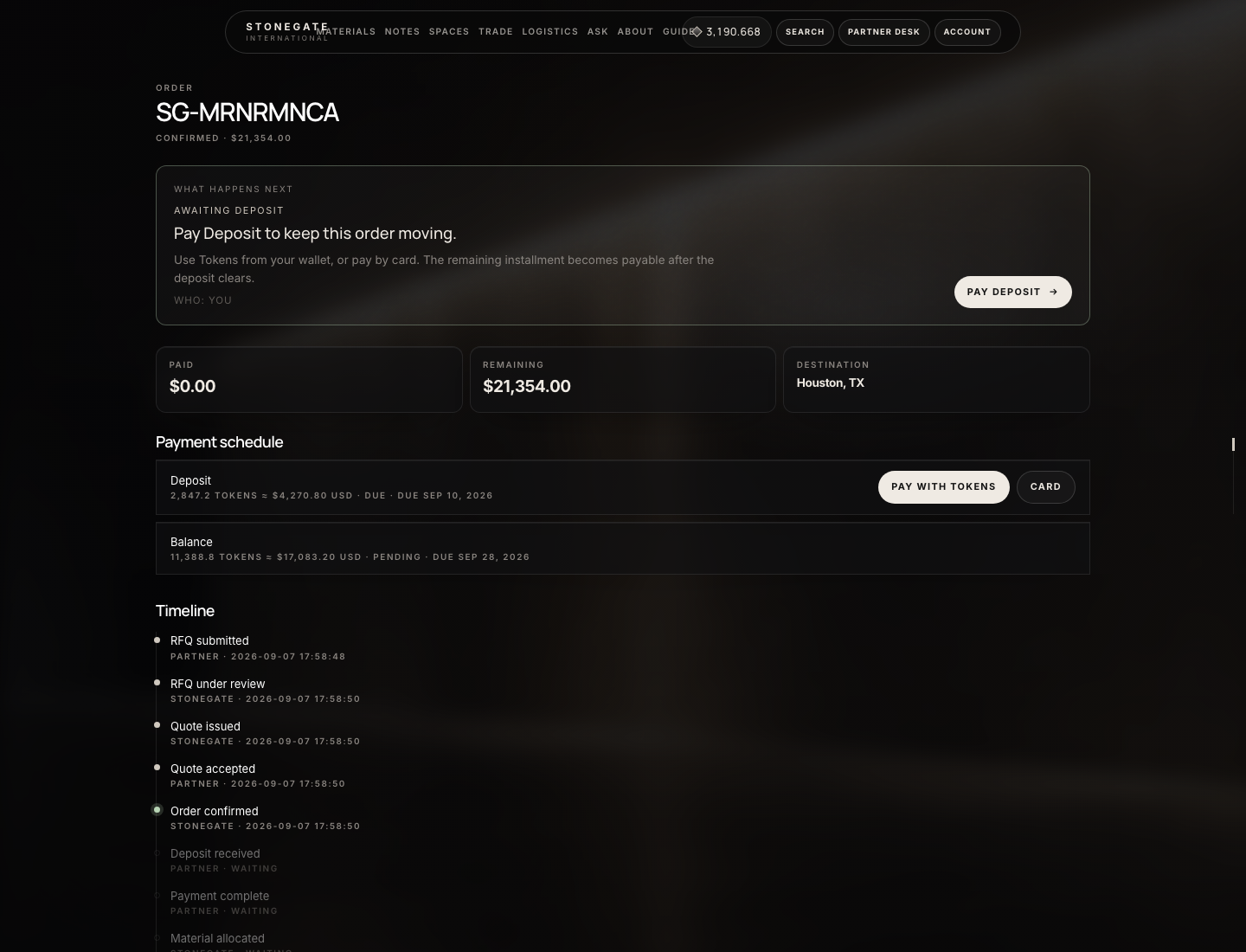
Open the file. Read What happens next first. Then match the block:
| You see | Who | Do this |
|---|---|---|
| Awaiting deposit / Pay deposit | Partner | Pay with Tokens or Card on the order. Buy Tokens if the wallet is short. |
| Balance pending | — | Normal until the deposit clears. Then the balance becomes due by itself. |
| Quote expired / no Accept | Admin | Trade → Ops → Extend, or open the quote → Create next version, then Send quote. |
| Quote still draft | Admin | Send quote. Partners cannot accept drafts. |
| Deposit paid, mill silent | Admin | Shop → Orders → In work card → mill address → Mark in work & send. If already stamped: check SMTP, resend. Wrong mill: change the address and send again. |
| Pay buttons missing on a due deposit | Admin | Desk role is buyer / viewer / project_manager. Assign company_admin or finance on Trade → Companies. |
| RFQ blocked on submit | Partner | Overweight load needs a permit file, or quantity sqft is empty. Legal limit is Trade → Settings. |
| Paid, no shipment | Admin | Trade → Containers → New container → attach this order. |
| No Partner Desk | Admin | Company approved + Assign user. See below. |
Admins: Trade → Ops is the attention list (waiting RFQs, expiring quotes, unpaid, delayed shipments, applications).
Quote declined or expired
- Partner Decline (reason ≥ 8 characters) releases reserved inventory and notifies admin. Draft a new quote from the RFQ if the job continues.
- Expired: partner sees “contact the trade desk”. Admin: Ops → Extend, or Create next version + Send quote.
- Request changes → negotiation. Admin issues a revised version. The partner accepts the current sent version, not the superseded one.
- Mill silence is not a status. Chase the in-work email. If the file should die: Admin → order → Cancel trade order (inventory + Tokens unwind; card refunds are manual in the gateway).
Token balance looks wrong
- Account → Activity. Every credit and debit is a row. Admin: Payments → Tokens → Wallets → that email (User ID is in the ID column).
- Bank buy still pending: not in the balance until Confirm bank.
- Spend happens on sample / cart / installment, not on Wallet.
- Shop Token refund: Admin → that order → Refund tokens.
- Trade Token spend: cancel the trade order to return milli. Reverse to wallet on a succeeded purchase is only if those Tokens are still in the wallet (it debits them back).
- The ledger will not go negative. A second concurrent spend fails instead of double-debiting.
Partner Desk is missing
- Applying on Partner Program is not enough. Company must be
approved, user assigned, login rolepartner. - Sign out and in after Assign user.
suspendedcompanies redirect to Partner Program. Set approved again if they should return.- Viewer / project manager can open the desk but cannot Accept or Pay — missing buttons are the desk role. Change it on Trade → Companies → Assign user (same User ID, new role).
- Buyer can Accept but cannot see Pay with Tokens / Card. Assign
company_adminfor a solo contact, or add afinanceuser.
Duplicates, notices, mill silence
- Quote accept is rejected if already accepted, expired, or not current. You cannot double-create
SG-…from the same quote version. - Missing partner notification: the quote or payment still exists on Desk → Quotes / Orders. Refresh. Admin notifications are a separate inbox.
- Production delay: admin notes on the order; tell the partner off-platform; Send Email from the admin order if needed.
- Wrong mill mailed: Mark in work again with the correct partner/mill address (SMTP must work).
- Shipment issue: Update status or add a note on Trade → Shipments. Partners only see what you stamp.